
How to Book an Apartment at Sobha Wisteria Online

How to book an apartment at Sobha Wisteria online comes down to five simple steps from home. You send an enquiry, take a virtual tour, and submit your Expression of Interest with KYC documents. After that, you pick your unit, get an allotment letter, and sign the agreement for sale. Most of this happens over email, video call and WhatsApp, so a Chennai visit stays optional.
Here is the full process in short:
- Send an enquiry through the official Sobha Wisteria website.
- Take a virtual tour or visit the Experience Centre in Siruseri.
- Submit your EOI form with KYC documents and a post-dated cheque.
- Choose your tower, floor and facing, then receive your allotment letter.
- Sign the agreement for sale and follow the 10:10:80 payment plan.
This guide walks you through each step and lists what to keep ready at every stage.
Sobha Wisteria Booking Stages at a Glance
| Stage | What You Do | What You Pay | What You Receive |
|---|---|---|---|
| Enquiry | Fill the online form with your BHK choice and budget | Nothing | Brochure, master plan and price sheet |
| Virtual or site tour | Join a video walkthrough or visit the model apartment | Nothing | Clear view of layouts and finishes |
| Expression of Interest | Submit the EOI form, KYC and a post-dated cheque | ₹3 lakh to ₹5 lakh cheque, based on BHK | Priority in unit selection |
| Unit allotment | Pick your tower, floor and facing | Booking amount, within the first 10% | Allotment letter by email |
| Agreement for sale | Sign and register the agreement | Next 10% of the price | Full legal rights as a buyer |
| Construction stages | Pay as each milestone gets done | Balance 80% in instalments | Regular progress updates |
Step 1: Send an Enquiry on the Official Website
Your booking journey starts with the enquiry form on the Sobha Wisteria contact page. The form takes less than two minutes, and the sales team calls you back soon after. Mention three details in your note so the team can share the right price sheet and plans.
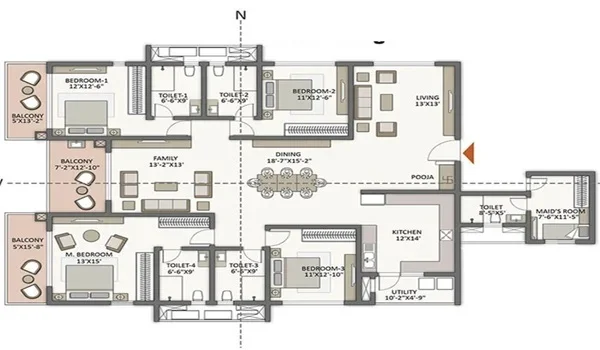
- Your configuration, from a 665 sq ft 1 BHK to a 2,300 sq ft 4 BHK
- Your budget range, so the team can suggest suitable towers and floors
- Whether you plan to live in the home or buy it as an investment
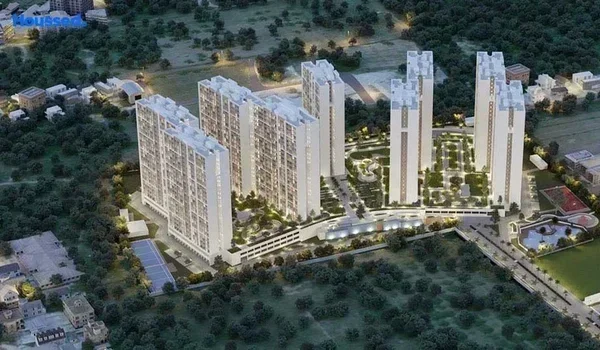
Once you submit the form, you receive the brochure and master plan by email. The master plan shows tower positions, open spaces and the entry points from both OMR and ECR.
Step 2: Take a Virtual Tour or Visit the Experience Centre
You do not need to travel to Chennai to see the project. The team arranges live video walkthroughs, short videos and photos for buyers who live outside the city. These come by email or WhatsApp, so you can review them with your family at your own pace.
If you live in Chennai, you can visit the Experience Centre in Siruseri, opposite SIPCOT IT Park. It stays open from 10 am to 7 pm on Monday to Saturday. On Sunday, it runs from 10 am to 5 pm. Our model apartments guide lists the points worth checking during your visit.
Step 3: Submit Your EOI with KYC Documents
Sobha Wisteria is in its pre-launch stage, so your online booking begins with an Expression of Interest. The EOI places you in the priority list when units open for allotment. You fill the EOI form online and share a post-dated cheque in favour of Sobha Limited.
| Configuration | Tentative EOI Cheque Amount |
|---|---|
| 1 BHK and 2 BHK | ₹3 lakh |
| 3 BHK | ₹4 lakh |
| 4 BHK | ₹5 lakh |
Keep scanned copies of these KYC documents ready before you start the form:
- PAN card of every buyer named on the application
- Aadhaar card, passport or voter ID as identity proof
- Recent passport size photos of each applicant
- Address proof, such as a utility bill or bank statement
Ask the team to confirm the EOI refund terms in writing, in case you change your mind later.
Step 4: Pick Your Unit and Get the Allotment Letter
When allotment opens, you choose your apartment by tower, size, floor level and facing. Every home at Sobha Wisteria comes with a sea view, but higher floors usually offer a wider view. These premium units often carry a higher price, so compare a few options first. Our tower and block selection guide can help you decide.
After you pay the booking amount, Sobha reserves your unit and emails you an allotment letter. This letter lists your tower, unit number, floor, facing and payment details. Keep it safe, since it proves your booking and your bank needs it for a home loan.
A Customer Relationship Manager then takes charge of your file and guides you through the next steps.
Step 5: Sign the Agreement for Sale and Start the Payment Plan
The agreement for sale is the most important document in your purchase. Under Section 13 of the RERA Act, a builder cannot collect over 10% before this agreement. So the agreement must be signed and registered before you pay anything beyond the first 10%.
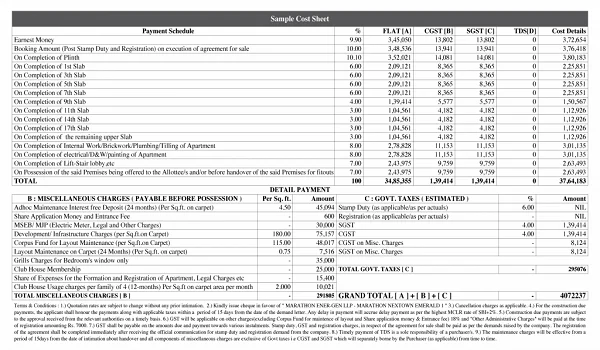
Sobha Wisteria follows a 10:10:80 payment plan, which keeps your early outflow low:
- 10% at the time of booking
- 10% when you sign the agreement for sale
- 80% in instalments linked to construction milestones
You also pay stamp duty and registration charges when you register the agreement. Our guide on stamp duty and registration charges in Tamil Nadu explains the current rates. For the full cost picture, check the Sobha Wisteria cost sheet as well.
If you plan to take a loan, start your eligibility check right after the EOI stage. The home loan process guide covers the banks and documents involved.
Booking Sobha Wisteria Online as an NRI
NRI buyers can finish almost the entire booking without flying down to Chennai. Video tours, scanned KYC and digital forms handle most of the early work. You will need a few extra documents compared with a resident buyer.
- A valid passport, along with your visa or OCI card
- Your overseas address proof
- PAN card, which you need for tax and property registration in India
- An NRE or NRO account, since all payments must come through Indian banking channels
For registration, you can give a Power of Attorney to a trusted family member in India. Our NRI guide to buying property in Chennai covers tax rules and repatriation in detail.
Safety Checks Before You Pay Anything Online
Online booking saves you time, but a few simple checks keep your money safe throughout the process.
- Pay only to Sobha Limited: Issue every cheque or bank transfer in the name of Sobha Limited, never to an individual.
- Check the RERA number: Formal sale and the agreement follow the project's Tamil Nadu RERA registration. Our guide on how to verify Sobha Wisteria on TN RERA shows you how to check it.
- Keep every receipt: Save payment receipts, emails and the allotment letter in one folder.
- Read before you sign: Check the carpet area, payment schedule and possession timeline in the agreement draft.
- Get offers in writing: Ask for any discount or special term on official Sobha letterhead or email.
FAQs
Yes. You can send an enquiry, take a video tour, submit the EOI and share KYC online. The agreement for sale needs registration, which an NRI can complete through a Power of Attorney.
The tentative EOI cheque is ₹3 lakh for a 1 BHK or 2 BHK. It rises to ₹4 lakh for a 3 BHK and ₹5 lakh for a 4 BHK.
You need a PAN card, identity proof such as Aadhaar, address proof and passport size photos. NRIs also need a visa or OCI card and an NRE or NRO account.
Issue every cheque and bank transfer in favour of Sobha Limited. Never pay a booking amount to an individual or a personal account.
The project follows a 10:10:80 plan. You pay 10% at booking and 10% at agreement, with the balance 80% linked to construction stages.
Sobha emails the allotment letter once you pay the booking amount for your chosen unit. It lists your tower, unit number, floor, facing and payment details. Ready to start your booking? Send your enquiry through the Sobha Wisteria contact page. The sales team will then share the latest availability sheet for your BHK.